English | 繁體中文
Make CORS a development-environment concern, not an application concern. seamless-cors uses PAC to automatically route selected requests through a local CORS proxy, letting the frontend keep its API URLs and request logic while the API server needs no extra CORS configuration for test environments.
Note
This project is under active development.
Warning
seamless-cors is intended only for local development and QA environments.
Start the gateway directly with npx:
npx seamless-cors startOn the first run, accept the prompt to create the Global Upstream List. Add one upstream per line to the path shown by the command:
api.dev.example.com
http://localhost:3000
https://api.example.com:8443
Save the file and retry the browser request. Changes are applied while the gateway is running; no restart is needed.
Expect start to remain attached to the terminal and temporarily configure a
PAC URL on eligible system network services. It leaves an existing foreign PAC
configuration unchanged. Press Ctrl+C when finished to stop the gateway and
remove seamless-cors-owned PAC settings.
The traffic runtime starts before System PAC delivery. PAC discovery, read,
write, or verification problems are reported without stopping that runtime; a
later effective routing change or another start makes a fresh delivery attempt.
For native HTTPS or the HTTPS Facade, install the development CA and approve the operating-system prompt:
npx seamless-cors installIf the gateway is already running, matching HTTPS routes activate immediately.
The CA remains installed after the gateway stops; remove it explicitly with
npx seamless-cors uninstall.
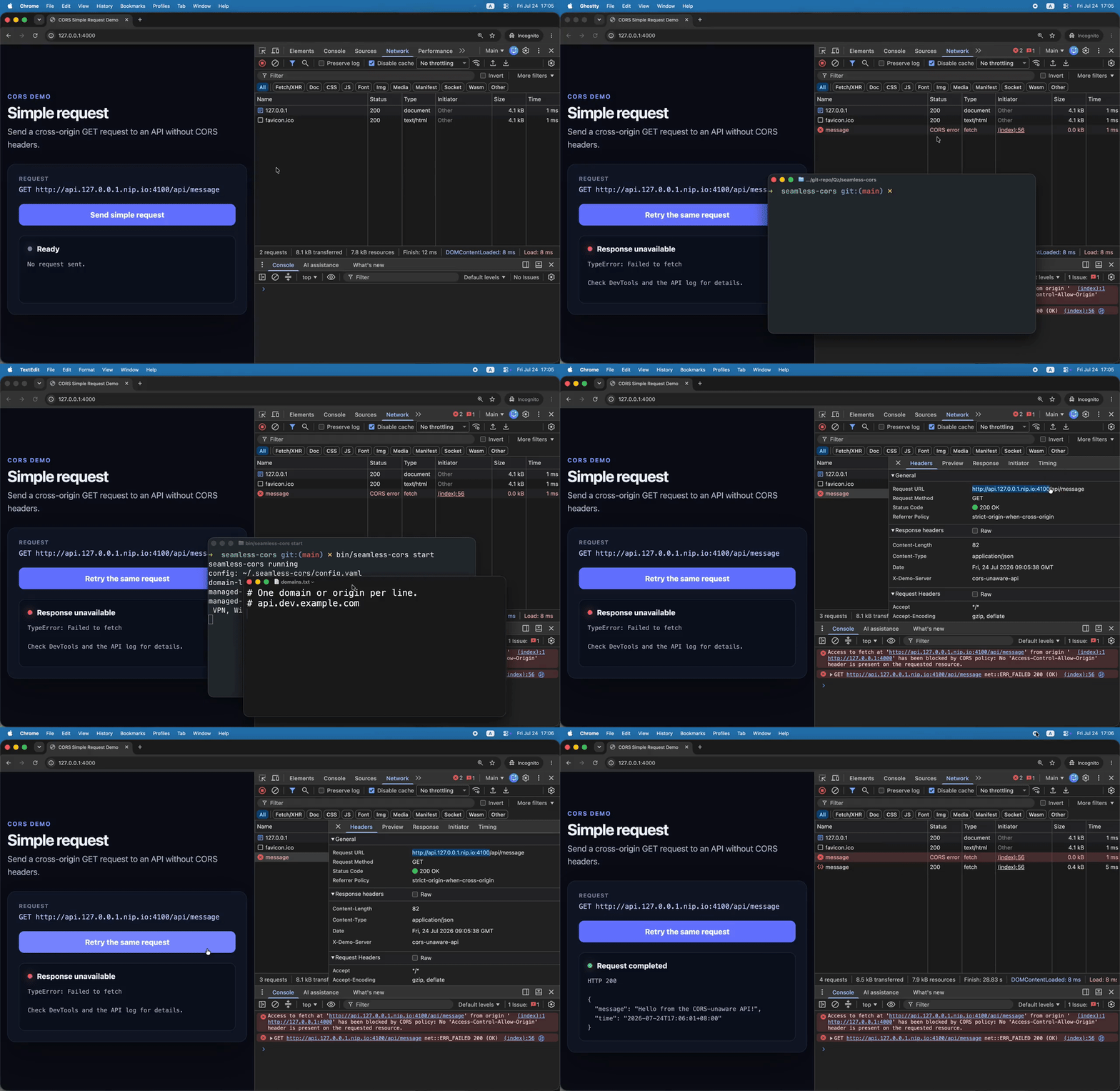
A cross-origin GET that the browser sends directly to an API without CORS
response headers.
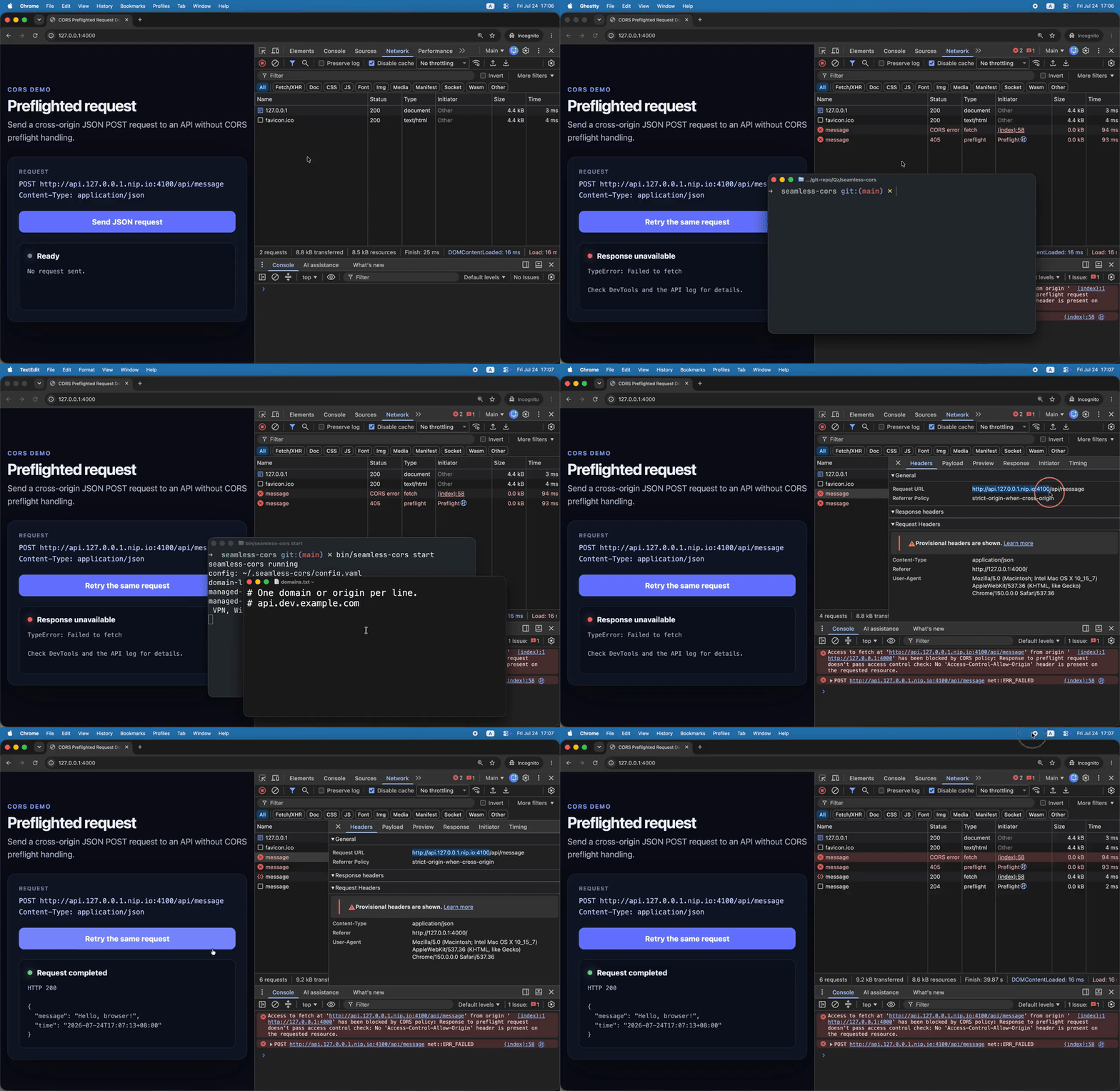
A JSON POST that first causes the browser to send an OPTIONS preflight
request.
Install the command globally:
npm install --global seamless-corsWith Go 1.27.0 or later installed, build and install the latest release:
go install github.com/QzCurious/seamless-cors/cmd/seamless-cors@latestEnsure the Go binary directory ($(go env GOPATH)/bin) is on your PATH.
Only requests matched by the Upstream Lists are routed through the gateway.
For a CORS preflight—an OPTIONS request with Origin and
Access-Control-Request-Method headers—seamless-cors answers locally with
204 No Content; the request is not sent to the upstream. The response:
- reflects the requesting origin, method, and requested headers;
- allows credentials;
- allows private-network access when the browser requests it; and
- uses
Access-Control-Max-Age: 0so preflight results are not cached.
For an actual request carrying Origin, the upstream still handles the request
normally. On the response path, seamless-cors replaces existing
Access-Control-* headers with its DEV/QA policy, reflects the requesting
origin, allows credentials, and exposes ordinary response headers. Responses to
requests without Origin are left unchanged, as are gateway-generated failure
responses.
This changes browser CORS enforcement only. It does not bypass authentication, authorization, cookies, CSRF protection, or application behavior at the upstream.
HTTP selectors work immediately. HTTPS selectors become active only while the
installed User CA is usable; otherwise HTTP continues working and start or
status reports HTTPS as blocked with an action to run seamless-cors install.
The HTTPS Facade gives a selected HTTP origin a browser-facing HTTPS address. For example:
http://app.test:3000  ->  https://app.test:3000  ->  http://app.test:3000
http://app.test       ->  https://app.test       ->  http://app.test
The first arrow is the URL the browser uses; the second is where the gateway forwards the request. HTTP port 80 maps to browser HTTPS port 443, and every other port is preserved. The facade is created only by an HTTP Origin Selector, not by a Host Selector, and is active whenever the User CA is usable.
When selectors overlap, a native HTTPS Origin Selector wins over a facade. An exact facade also wins over a broader Host Selector. Selector source and line order do not change this specificity.
Absolute redirects back to the selected HTTP origin are rewritten to the
browser-facing HTTPS origin. Relative redirects and redirects to other origins
are untouched. The facade does not rewrite response bodies, cookies, or
security headers, and it does not add Forwarded or X-Forwarded-Proto, so the
HTTP upstream does not need facade-specific support.
Two files contribute to one Effective Upstream List:
| Source | Location | Behavior |
|---|---|---|
| Global | seamless-cors/upstreams.txt under the platform configuration home |
Always observed; start offers to create it when missing. |
| Directory | upstreams.txt in the exact directory from which the gateway was started |
Optional; useful for entries associated with one working directory. |
Default Global Upstream List paths are:
| Platform | Default path |
|---|---|
| Linux | ~/.config/seamless-cors/upstreams.txt |
| macOS | ~/Library/Application Support/seamless-cors/upstreams.txt |
| Windows | %LOCALAPPDATA%\seamless-cors\upstreams.txt |
XDG_CONFIG_HOME overrides the platform configuration home. The former
~/.seamless-cors/upstreams.txt path is not read or migrated.
Both files are watched independently and merged without source precedence. Equivalent normalized selectors are active only once. Adding, changing, removing, or recreating either file updates routing without a restart. The Directory Upstream List location itself is fixed for the lifetime of the gateway; stop and start from another directory to select a different one.
Blank lines and comments beginning with # are ignored. A comment may follow a
selector when whitespace separates it from #. Invalid lines are ignored and
reported as warnings while valid lines remain active.
Each non-comment line is either a Host Selector or an Origin Selector:
| Form | Example | Match |
|---|---|---|
| Exact Host Selector | api.example.com |
That hostname over HTTP on any port; also HTTPS on any port while the User CA is usable. |
| Wildcard Host Selector | *.test.example.com |
Exactly one leading label, such as api.test.example.com; not the parent or a deeper name. Ports and schemes behave like an exact Host Selector. |
| HTTP Origin Selector | http://localhost:3000 |
Only that HTTP origin, plus its exact HTTPS Facade while the User CA is usable. |
| HTTPS Origin Selector | https://api.example.com:8443 |
Only that HTTPS origin; requires a usable User CA. |
Host Selectors cannot contain a scheme or port. Origin Selectors require
http:// or https://, do not allow wildcards, and cannot contain a path,
query, or fragment. IPv4 and bracketed IPv6 forms are supported. Hostnames and
schemes are normalized to lowercase, and omitted default ports normalize to 80
for HTTP and 443 for HTTPS, so https://api.example.com and
https://api.example.com:443 are equivalent.
The same commands can be invoked through a global installation or with the
npx seamless-cors ... prefix.
| Command | Behavior |
|---|---|
seamless-cors start |
Starts the gateway in the foreground, watches both Upstream Lists, and delivers PAC to every currently eligible Network Service. A second start keeps the runtime and makes another delivery attempt. |
seamless-cors stop |
Stops a running gateway, or cleans up seamless-cors-owned System PAC and runtime state even when no live owner is found. Cleanup uncertainty is reported prominently after the best-effort command completes successfully. |
seamless-cors status |
Freshly observes every visible Network Service and reports gateway, routing, CORS, facade, Upstream List, System PAC, and User CA state without changing it. Retained delivery diagnostics are labeled as historical. Output is intended for people rather than a stable scripting interface. |
seamless-cors install |
Installs, repairs, or renews the current-user development CA. A running gateway adopts the usable CA immediately. |
seamless-cors uninstall |
Removes all seamless-cors User CAs and local CA material. If HTTPS interception is active, asks for confirmation and disables HTTPS while leaving a running gateway's HTTP handling available. |
seamless-cors serve |
Runs only the local gateway control owner. It does not start browser traffic handling or change PAC settings until a separate start command activates the runtime. |
seamless-cors version |
Prints the installed version. |
Running install again is safe when the CA is already installed. A running
gateway stays up while it briefly withdraws CA-backed HTTPS routes, renews the
CA, and restores those routes when the replacement is usable.
The HTTPS Facade works for non-loopback origins. For example, while HTTPS
Readiness is ready, an http://httpforever.com Origin Selector exposes the
origin as https://httpforever.com.
Chrome implicitly bypasses proxies for loopback destinations such as
localhost, *.localhost, 127.0.0.0/8, and [::1]. This bypass also applies
to PAC scripts and cannot be disabled by the PAC file, so seamless-cors never
receives those requests. For example, an http://localhost:3000 Origin Selector
cannot make https://localhost:3000 pass through the HTTPS Facade in Chrome.
This is a Chrome routing limitation, not an HTTPS Facade limitation.
Use a non-loopback hostname such as app.test and resolve it to 127.0.0.1
through your hosts file or local DNS. Then select http://app.test:3000 and open
https://app.test:3000. Chrome chooses the proxy before resolving that hostname,
allowing seamless-cors to route the request to the local origin.
Chrome's special <-loopback> bypass-list rule can override the implicit bypass
for a manually configured proxy, but it cannot make a PAC script proxy loopback
traffic. See Chromium's documentation on
implicit proxy bypass rules.
| Purpose | Location |
|---|---|
| Global Upstream List | XDG configuration home |
| Installed UserCA material | XDG state home |
| Gateway lock and discovery state | XDG runtime directory |
| Directory Upstream List | Start working directory |
When upgrading from a version that used ~/.seamless-cors/runtime, stop the
older gateway first. That directory is not read, and its lock or discovery
files are not migrated; after the old process has stopped, stale legacy files
may be removed manually. Do not run old and new binaries concurrently, because
their different lock paths can bypass mutual exclusion.
The managed platform integrations currently target macOS and Windows.