





A game development library for C++ beginners. Just one header file, no installation needed -- write include "GameLib.h" and start making games.
Many C++ beginners report that, unlike other languages where you can get something running in a few lines, the most painful experience is spending weeks learning C++ and still only being able to cout a line of text in a black console window. Building "a real program" feels impossibly far away, with almost zero positive feedback. Want to use SDL or SFML? Just setting up the environment and linking libraries is enough to exhaust you -- before you've even written your first line of game logic, you already want to give up.
GameLib was born to eliminate that pain. Drop GameLib.h into your project folder and, in ten lines of code, draw a colorful circle controlled by the keyboard -- windows, drawing, keyboard, mouse, sprites, sound, collision detection, all included. No SDK to download, no paths to configure, no libraries to link. It's like PyGame for the C++ world: hiding all the complexity and leaving only the fun of making games.

#include "GameLib.h"

int main()
{
    GameLib game;
    game.Open(640, 480, "My Game", true);

    int x = 320, y = 240;

    while (!game.IsClosed()) {
        if (game.IsKeyDown(KEY_LEFT))  x -= 3;
        if (game.IsKeyDown(KEY_RIGHT)) x += 3;
        if (game.IsKeyDown(KEY_UP))    y -= 3;
        if (game.IsKeyDown(KEY_DOWN))  y += 3;

        game.Clear(COLOR_BLACK);
        game.FillCircle(x, y, 15, COLOR_CYAN);
        game.DrawText(10, 10, "Up/Down/Left/Right to move!", COLOR_WHITE);
        game.Update();
        game.WaitFrame(60);
    }
    return 0;
}
Compile:
g++ main.cpp -o game.exeNo extra compiler flags needed at all. Many C++ beginners don't even know how to compile from the command line -- they just click "Compile & Run" in Dev-C++. Asking them to add linker flags like -ld3d9x the way other libraries do would turn away a huge number of people. That's why this library works entirely with default compiler settings: all dependencies are dynamically loaded at runtime.
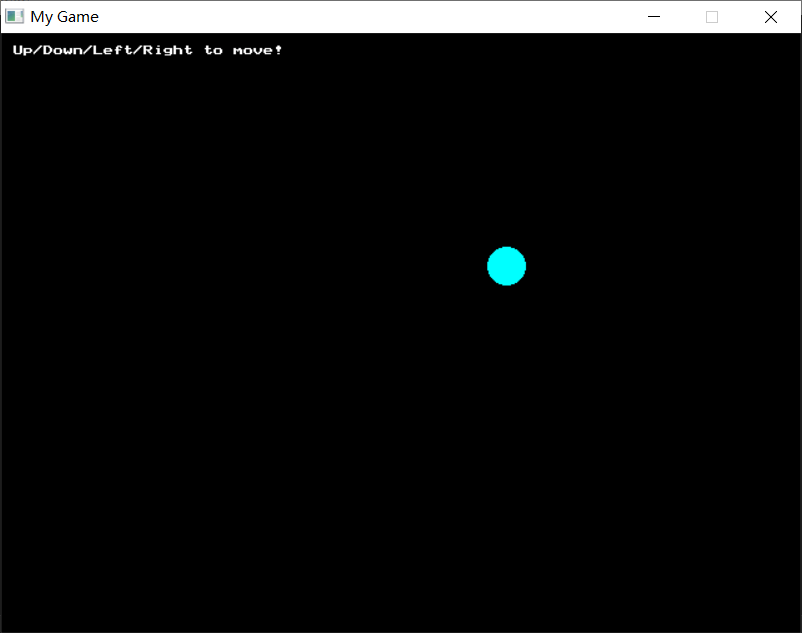
A few lines of code and you get instant visual feedback.
Existing game libraries (SDL, SFML, raylib) are all great, but for C++ beginners:
- SDL requires configuring header paths and linking a dozen DLLs, with complex usage
- SFML requires CMake
- raylib requires linear algebra knowledge, 3D basics, C/C++ proficiency, and compilation/installation
GameLib's goal is zero barrier to entry: copy GameLib.h into your project folder, write a .cpp file, hit compile, and your game runs.
It's specifically designed for Dev C++ (the IDE used in many school programming courses), compatible with its bundled GCC 4.9.2 compiler. Of course, any Windows compiler supporting C++11 will work.
- Single header file
GameLib.h, copy and use - No dependency on SDL / SFML / DirectX / OpenGL
- No need for
-lgdi32 -lwinmm -lgdiplus -lole32linker flags; you can optionally add-mwindows(which suppresses the console window on launch) - Compatible with Dev C++'s bundled GCC 4.9.2
(Note: By popular demand, a SDL2 version GameLib.SDL.h has been ported for Linux/macOS, also as a single header file. See SDL2PORT.md for details.)
- Draw pixels, lines, rectangles, circles, ellipses, triangles (stroke and fill)
- Clip rectangles (
SetClip/ClearClip), all drawing automatically constrained by the clip region - Built-in 8x8 pixel bitmap font supporting all printable ASCII characters
DrawTextFontsupports scalable fonts and UTF-8 text outputDrawPrintfformats output on screen just likeprintfScreenshotsaves the current frame to a BMP file with one line of codeShowFps(true)displays real-time FPS in the title bar- All graphics algorithms implemented internally (Bresenham line, midpoint circle, scanline fill)
- Load PNG, JPG, BMP, GIF and more
- Support for 8-bit palette, 24-bit, 32-bit images (auto-converted to 32-bit ARGB)
- 24-bit images automatically get full alpha channel (set to opaque)
- Flip, Color Key transparency, Alpha blending, region clipping, scaling, rotation, frame-based drawing
- Managed by integer IDs -- no need to understand pointers or object lifetimes
IsKeyDown-- held-down detectionIsKeyPressed-- single press detection (triggers once on press)IsKeyReleased/IsMouseReleased-- single release detection- Mouse position, three-button state, and scroll wheel delta
IsActive()checks whether the window has focus, handy for pausing games- Predefined constants for all common keys:
KEY_A~KEY_Z, arrow keys, F1~F12
PlayWAV-- play sound effects (WAV format, asynchronous, returns success status)PlayMusic/StopMusic-- play background music (MP3/MIDI/WAV; MCI type selected by file extension, MIDI looping uses notify replay)IsMusicPlaying()-- query current background music playback status- Sound effects and music on independent channels, no interference
Random(min, max)-- random numbersRectOverlap/CircleOverlap-- collision detectionDistance-- distance between two pointsDrawGrid/FillCell-- grid drawing (great for Tetris, board games)GetDeltaTime/GetFPS-- frame time and frame rate
CreateTilemap-- create tile maps from tileset spritesSaveTilemap/LoadTilemap-- save or load plain-text.glmmap dataSetTile/GetTile/FillTileRect/ClearTilemap-- set tiles individually or in bulkGetTilemapCols/GetTilemapRows/GetTileSize-- read map metadataWorldToTileCol/WorldToTileRow/GetTileAtPixel-- convert pixel coordinates to tile coordinatesDrawTilemap-- render maps with opaque, Color Key, or Alpha modes- Only draws tiles visible on screen -- no lag even with large maps
- Easily implement side-scrolling and parallax with camera offset
- Set
resizable=trueinOpen()to create a user-resizable window - Framebuffer logical size is fixed at
Opentime; the window auto-stretches to fill when resized WinResize(w, h)to programmatically resize the window,SetMaximized(true)for one-click maximize- Mouse coordinates automatically mapped back to framebuffer logical coordinates
SetScene/GetScene/IsSceneChanged-- use integers to identify scenes, takes effect next frameIsSceneChanged()returnstrueon the first frame of a new scene, handy for initialization- Combine with
enumandswitchfor menu -> gameplay -> game-over scene transitions
SaveInt/SaveFloat/SaveString-- save data to file in one lineLoadInt/LoadFloat/LoadString-- load data in one line, with default values if missing- Static functions, callable without a GameLib instance
- Plain-text
key=valueformat, human-readable
Button-- immediate-mode button with automatic hover / pressed visual statesCheckbox-- checkbox that auto-toggles on clickRadioBox-- radio button, shared variable for mutual exclusion within a groupToggleButton-- toggle button that stays pressed when toggled on- Uses built-in 8x8 bitmap font, zero dependencies, zero configuration
Place GameLib.h in your project folder.
Create a main.cpp:
#include "GameLib.h"

int main()
{
    GameLib game;
    game.Open(800, 600, "Hello GameLib", true);

    while (!game.IsClosed()) {
        game.Clear(COLOR_DARK_BLUE);
        game.DrawTextScale(200, 250, "Hello, World!", COLOR_GOLD, 3);
        game.DrawText(280, 320, "Press ESC to exit", COLOR_GRAY);

        if (game.IsKeyPressed(KEY_ESCAPE))
            break;

        game.Update();
        game.WaitFrame(60);
    }
    return 0;
}Dev C++: New Project > Add main.cpp > Compile and Run.
Command line:
g++ -o game.exe main.cpp -mwindows#include "GameLib.h"
int main()
{
GameLib game;
game.Open(640, 480, "Bouncing Ball", true);
float x = 320, y = 240;
float vx = 4, vy = 3;
int r = 20;
while (!game.IsClosed()) {
// Move
x += vx;
y += vy;
// Bounce off walls
if (x - r < 0 || x + r > game.GetWidth()) vx = -vx;
if (y - r < 0 || y + r > game.GetHeight()) vy = -vy;
// Draw
game.Clear(COLOR_BLACK);
game.FillCircle((int)x, (int)y, r, COLOR_RED);
game.DrawPrintf(10, 10, COLOR_WHITE, "FPS: %.0f", game.GetFPS());
game.Update();
game.WaitFrame(60);
}
return 0;
}#include "GameLib.h"
int main()
{
GameLib game;
game.Open(640, 480, "Input Demo", true);
int px = 320, py = 240;
while (!game.IsClosed()) {
// Keyboard controls the square
if (game.IsKeyDown(KEY_A)) px -= 3;
if (game.IsKeyDown(KEY_D)) px += 3;
if (game.IsKeyDown(KEY_W)) py -= 3;
if (game.IsKeyDown(KEY_S)) py += 3;
// Mouse position
int mx = game.GetMouseX();
int my = game.GetMouseY();
game.Clear(COLOR_DARK_GRAY);
// Square
game.FillRect(px - 15, py - 15, 30, 30, COLOR_GREEN);
// Mouse crosshair
game.DrawLine(mx - 20, my, mx + 20, my, COLOR_YELLOW);
game.DrawLine(mx, my - 20, mx, my + 20, COLOR_YELLOW);
// Draw circle on mouse click
if (game.IsMouseDown(MOUSE_LEFT)) {
game.FillCircle(mx, my, 10, COLOR_RED);
}
game.DrawPrintf(10, 10, COLOR_WHITE, "Player: %d, %d", px, py);
game.DrawPrintf(10, 22, COLOR_WHITE, "Mouse: %d, %d", mx, my);
game.Update();
game.WaitFrame(60);
}
return 0;
}#include "GameLib.h"
int main()
{
GameLib game;
game.Open(800, 600, "Starfield", true);
// Generate 200 stars
int sx[200], sy[200], speed[200];
uint32_t colors[] = {COLOR_WHITE, COLOR_LIGHT_GRAY, COLOR_YELLOW, COLOR_CYAN};
for (int i = 0; i < 200; i++) {
sx[i] = GameLib::Random(0, 799);
sy[i] = GameLib::Random(0, 599);
speed[i] = GameLib::Random(1, 5);
}
while (!game.IsClosed()) {
game.Clear(COLOR_BLACK);
for (int i = 0; i < 200; i++) {
sx[i] -= speed[i];
if (sx[i] < 0) {
sx[i] = 800;
sy[i] = GameLib::Random(0, 599);
}
game.SetPixel(sx[i], sy[i], colors[speed[i] % 4]);
}
game.DrawText(250, 290, "Press ESC to exit", COLOR_GRAY);
if (game.IsKeyPressed(KEY_ESCAPE)) break;
game.Update();
game.WaitFrame(60);
}
return 0;
}More examples in the examples/ directory.
The examples/ directory contains 21 progressive examples that demonstrate GameLib's features step by step, covering windows, graphics, input, sprites, sound, tilemap, clip rectangles, font text, scaled drawing, rotated drawing, and UI controls.
Compile any example:
g++ -o 03_shapes.exe examples/03_shapes.cpp -mwindowsRun it:
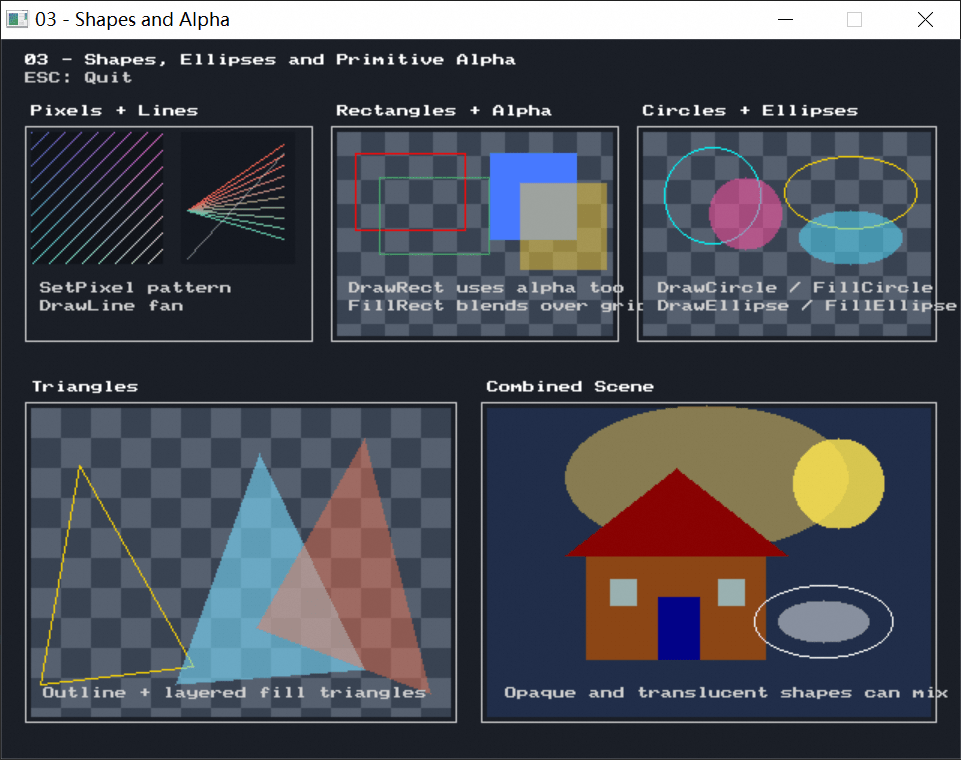
That's it.
| Example | Description | What You'll Learn |
|---|---|---|
01_hello.cpp |
Hello World | Game loop, window creation, text drawing |
02_moving_box.cpp |
Keyboard-controlled moving box | Keyboard input, real-time updates |
03_shapes.cpp |
All shape drawing showcase | Lines, rectangles, circles, triangles (stroke & fill) |
04_bouncing_ball.cpp |
Bouncing ball | Float-based motion, wall bounce, DrawPrintf |
| Example | Description | What You'll Learn |
|---|---|---|
05_paint.cpp |
Simple paint program | Mouse input, scroll wheel brush size, focus-loss pause |
06_catch_fruit.cpp |
Fruit catching mini-game | Random, collision detection, scoring |
07_shooting_stars.cpp |
Simple shooter | Array-based multi-object management, bullet firing, collision destruction |
| Example | Description | What You'll Learn |
|---|---|---|
08_sprite_demo.cpp |
Sprite loading and drawing | LoadSpriteBMP, flipping, region clipping |
09_sprite_animation.cpp |
Sprite frame animation | DrawSpriteRegion for sprite sheet animation |
10_sound_demo.cpp |
Sound playback demo | PlayWAV effects, PlayMusic background music |
| Example | Description | What You'll Learn |
|---|---|---|
11_snake.cpp |
Snake | DrawGrid/FillCell, game state machine |
12_breakout.cpp |
Breakout | Advanced collision detection, multi-object management |
13_space_shooter.cpp |
Space Shooter | Comprehensive: sprites + sound + collision + scrolling background + scoring |
| Example | Description | What You'll Learn |
|---|---|---|
14_tilemap.cpp |
Dual-layer scrolling | FillTileRect/ClearTilemap, pixel-to-tile conversion, parallax scrolling |
18_tilemap_file.cpp |
Tilemap file I/O | SaveTilemap, LoadTilemap, the plain-text .glm format |
19_clip_tilemap.cpp |
Clipped scrolling windows | SetClip/ClearClip, dual-layer tilemaps, clipped sprites / text / shapes |
| Example | Description | What You'll Learn |
|---|---|---|
15_font_text.cpp |
Scalable fonts | DrawTextFont, Chinese text output, different font sizes |
16_playsound.cpp |
Simple sound playback | PlayWAV, key-triggered sound effects |
17_sprite_scaling.cpp |
Sprite scaled drawing | LoadSprite, DrawSpriteScaled / DrawSpriteFrameScaled, scroll wheel zoom |
20_sprite_rotation.cpp |
Sprite rotation drawing | CreateSprite, DrawSpriteRotated / DrawSpriteFrameRotated, center-based rotation |
| Example | Description | What You'll Learn |
|---|---|---|
21_ui_controls.cpp |
UI controls demo | Button, Checkbox, RadioBox, ToggleButton immediate-mode UI |
| Function | Description |
|---|---|
Open(w, h, title, center, resizable) |
Create window; w/h sets framebuffer logical size, center=true to center, resizable=true for user-resizable window |
IsClosed() |
Whether the window is closed |
Update() |
Refresh display and process input |
WaitFrame(fps) |
Frame rate control |
GetWidth() / GetHeight() |
Framebuffer logical dimensions |
WinResize(w, h) |
Set window client area size |
SetMaximized(maximized) |
Maximize or restore a resizable window |
GetDeltaTime() |
Frame interval (seconds) |
GetFPS() |
Current frame rate |
GetTime() |
Total elapsed time (seconds) |
SetTitle(title) |
Change window title |
ShowFps(show) |
Show real-time FPS in title bar |
ShowMouse(show) |
Show or hide mouse cursor in window |
ShowMessage(text, title, buttons) |
Show message box (MESSAGEBOX_OK or MESSAGEBOX_YESNO) |
| Function | Description |
|---|---|
Clear(color) |
Clear screen |
SetPixel(x, y, color) |
Draw pixel |
GetPixel(x, y) |
Read pixel |
SetClip(x, y, w, h) |
Set clip rectangle |
ClearClip() |
Clear clip, restore full screen |
Screenshot(filename) |
Save current frame as 24-bit BMP file |
DrawLine(x1, y1, x2, y2, color) |
Draw line |
DrawRect(x, y, w, h, color) |
Rectangle outline |
FillRect(x, y, w, h, color) |
Filled rectangle |
DrawCircle(cx, cy, r, color) |
Circle outline |
FillCircle(cx, cy, r, color) |
Filled circle |
DrawEllipse(cx, cy, rx, ry, color) |
Ellipse outline |
FillEllipse(cx, cy, rx, ry, color) |
Filled ellipse |
DrawTriangle(...) |
Triangle outline |
FillTriangle(...) |
Filled triangle |
| Function | Description |
|---|---|
DrawText(x, y, text, color) |
Draw text |
DrawNumber(x, y, number, color) |
Draw integer |
DrawTextScale(x, y, text, color, scale) |
Draw scaled text |
DrawPrintf(x, y, color, fmt, ...) |
Formatted output |
DrawTextFont(x, y, text, color, size) |
Draw text with default font |
DrawTextFont(x, y, text, color, font, size) |
Draw text with specified font |
GetTextWidthFont(...) / GetTextHeightFont(...) |
Measure font text dimensions |
| Function | Description |
|---|---|
CreateSprite(w, h) |
Create blank sprite, returns ID |
LoadSprite(filename) |
Load image sprite (PNG/JPG/BMP/GIF/TIFF, UTF-8 path) |
LoadSpriteBMP(filename) |
Load sprite from BMP (8/24/32-bit, UTF-8 path) |
FreeSprite(id) |
Free sprite |
DrawSprite(id, x, y) |
Draw sprite |
DrawSpriteEx(id, x, y, flags) |
Draw with flip/transparency/alpha blending |
DrawSpriteRegion(id, x, y, sx, sy, sw, sh) |
Draw sprite sub-region |
DrawSpriteRegionEx(...) |
Draw sprite sub-region with flags |
DrawSpriteScaled(id, x, y, w, h, flags) |
Draw sprite scaled to target size |
DrawSpriteRotated(id, cx, cy, angleDeg, flags) |
Draw sprite rotated around its center |
DrawSpriteFrame(...) |
Draw frame from sprite sheet by frame number |
DrawSpriteFrameScaled(...) |
Draw scaled frame from sprite sheet by frame number |
DrawSpriteFrameRotated(...) |
Draw a sprite-sheet frame rotated around its center |
SetSpritePixel(id, x, y, color) |
Modify sprite pixel |
GetSpritePixel(id, x, y) |
Read sprite pixel |
SetSpriteColorKey(id, color) |
Set sprite's Color Key |
GetSpriteColorKey(id) |
Get sprite's Color Key |
Sprite flags: SPRITE_FLIP_H (horizontal flip), SPRITE_FLIP_V (vertical flip), SPRITE_COLORKEY (transparent by sprite's current Color Key, default magenta), SPRITE_ALPHA (alpha blending)
The default DrawSprite(id, x, y) uses the opaque fast path. If your assets rely on transparent holes, explicitly pass SPRITE_COLORKEY or SPRITE_ALPHA.
| Function | Description |
|---|---|
IsKeyDown(key) |
Whether key is held down |
IsKeyPressed(key) |
Whether key was just pressed (single trigger) |
IsKeyReleased(key) |
Whether key was just released (single trigger) |
GetMouseX() / GetMouseY() |
Mouse position |
IsMouseDown(button) |
Whether mouse button is pressed |
IsMousePressed(button) |
Whether mouse button was just pressed (single trigger) |
IsMouseReleased(button) |
Whether mouse button was just released (single trigger) |
GetMouseWheelDelta() |
Accumulated scroll wheel delta since last Update() |
IsActive() |
Whether the window is currently active |
| Function | Description |
|---|---|
PlayWAV(filename, loop) |
Play sound effect, returns true on success |
StopWAV() |
Stop sound effects |
PlayMusic(filename, loop) |
Play background music (MP3/MIDI/WAV; MCI type selected by file extension, MIDI looping uses notify replay), returns true on success |
StopMusic() |
Stop background music |
IsMusicPlaying() |
Whether music is currently playing |
PlayBeep(freq, duration) |
Beep |
| Function | Description |
|---|---|
Random(min, max) |
Random number |
RectOverlap(...) |
Rectangle collision detection |
CircleOverlap(...) |
Circle collision detection |
PointInRect(px, py, x, y, w, h) |
Point inside rectangle |
Distance(x1, y1, x2, y2) |
Distance between two points |
DrawGrid(x, y, rows, cols, size, color) |
Draw grid |
FillCell(gx, gy, row, col, size, color) |
Fill grid cell |
| Function | Description |
|---|---|
SetScene(scene) |
Switch scene (takes effect next frame) |
GetScene() |
Get current scene |
IsSceneChanged() |
Whether this frame just entered a new scene |
GetPreviousScene() |
Get previous scene before the switch |
| Function | Description |
|---|---|
Button(x, y, w, h, text, color) |
Immediate-mode button, returns true on click |
Checkbox(x, y, text, &checked) |
Checkbox, toggles checked on click |
RadioBox(x, y, text, &value, index) |
Radio button, shared value pointer for mutual exclusion |
ToggleButton(x, y, w, h, text, &toggled, color) |
Toggle button, stays pressed when toggled is true |
| Function | Description |
|---|---|
SaveInt(filename, key, value) |
Save integer (static function) |
SaveFloat(filename, key, value) |
Save float |
SaveString(filename, key, value) |
Save string |
LoadInt(filename, key, defaultValue) |
Load integer, returns default if missing |
LoadFloat(filename, key, defaultValue) |
Load float |
LoadString(filename, key, defaultValue) |
Load string |
HasSaveKey(filename, key) |
Check if key exists |
DeleteSaveKey(filename, key) |
Delete a specific key |
DeleteSave(filename) |
Delete entire save file |
| Function | Description |
|---|---|
CreateTilemap(cols, rows, tileSize, tilesetId) |
Create tile map, returns ID |
SaveTilemap(filename, mapId) |
Save map to a plain-text .glm file |
LoadTilemap(filename, tilesetId) |
Load map from a plain-text .glm file |
FreeTilemap(mapId) |
Free map |
SetTile(mapId, col, row, tileId) |
Set tile (-1=empty) |
GetTile(mapId, col, row) |
Read tile |
GetTilemapCols(mapId) / GetTilemapRows(mapId) |
Read map column/row count |
GetTileSize(mapId) |
Read map tile size |
WorldToTileCol(mapId, x) / WorldToTileRow(mapId, y) |
Convert pixel to tile coordinates |
GetTileAtPixel(mapId, x, y) |
Read tile at pixel position |
FillTileRect(mapId, col, row, cols, rows, tileId) |
Batch fill rectangular area |
ClearTilemap(mapId, tileId) |
Fill entire map with specified tile (default -1 to clear) |
DrawTilemap(mapId, x, y, flags) |
Draw map (supports ColorKey/Alpha) |
A tileset is a regular sprite (LoadSprite / CreateSprite), automatically sliced by tileSize. WorldToTileCol/Row uses floor division even for negative coordinates. DrawTilemap defaults to the opaque fast path, drawing only visible tiles; pass (-cameraX, -cameraY) for scrolling, and explicitly pass SPRITE_COLORKEY or SPRITE_ALPHA for transparent holes. .glm is a plain-text format: line 1 is GLM1, line 2 is tileSize rows cols, and each following line stores one tile row separated by spaces or tabs. When loading, values beyond cols on a row are ignored, missing values are filled with -1, extra rows beyond rows are ignored, and missing rows stay -1. The file does not store a tileset path; the caller provides tilesetId when loading.
COLOR_BLACK    COLOR_WHITE     COLOR_RED       COLOR_GREEN     COLOR_BLUE
COLOR_YELLOW   COLOR_CYAN      COLOR_MAGENTA   COLOR_ORANGE    COLOR_PINK
COLOR_PURPLE   COLOR_GRAY      COLOR_DARK_GRAY COLOR_LIGHT_GRAY
COLOR_DARK_RED COLOR_DARK_GREEN COLOR_DARK_BLUE COLOR_SKY_BLUE
COLOR_BROWN    COLOR_GOLD      COLOR_TRANSPARENT
Custom colors: COLOR_RGB(r, g, b) or COLOR_ARGB(a, r, g, b)
- Space Shooter
- Side-Scrolling Platformer
- Tetris
- Snake
- Breakout
- Maze
- Fruit Catcher
- Bullet Hell
- Turn-Based RPG (scene switching + save/load)
- Visual Novel / Text Adventure (multi-scene + branching dialogue)
- Map Editor (tilemap + UI controls)
- Paint Program
- Course Project Demos (instant visuals, zero-config delivery)
- Any 2D mini-game or interactive app you can think of
- Double Buffering: All drawing writes to an in-memory framebuffer (
uint32_t*ARGB);Update()flushes to the window via DIB Section +BitBlt(orStretchBltwhen scaled), flicker-free - Self-Implemented Graphics: Does not call GDI primitives like
LineToorEllipse; line, circle, ellipse, and triangle algorithms are all implemented within the library - Font Backend: Scalable font text currently implemented via GDI's
CreateFontW/TextOutW/GetTextExtentPoint32W - Precise Window Size:
Open()guarantees the client area exactly matches the requested dimensions (with high-DPI secondary correction) - stb-Style Single Header: Include enables implementation by default; multi-file projects can use
GAMELIB_NO_IMPLEMENTATIONto control this
- Windows 7 or later
- Any compiler supporting C++11 (GCC 4.9+, MSVC 2015+, Clang)
- Recommended IDEs: Dev C++, Visual Studio, Code::Blocks
Looking for game assets? Check out these sites:
- Classic game sprite resources: https://www.spriters-resource.com
- Pixel art resources: http://www.charas-project.net/resources.php?lang=en
- More pixel assets: https://craftpix.net/tags/pixel-art-game-assets-download
You can also visit PyGame's Resources page for free images, audio, and font resources.
MIT License. Use it however you want.